Keeping an updated photography portfolio can be tedious work. It would be ideal to update your portfolio after every job to keep things current, but personally speaking, during busy season working on my website is the last thing I have time for! Since 90% of my client work is done between June and December, I use Jan/Feb to give my website a facelift. It’s great to start the new year with a fresh look, and likely you will already be updating your pricing/policies so it’s a perfect time to get all the website work done at once.
Now, I don’t condone only showing new work a few times a year. You should be blogging current work, and posting regularly on Facebook/Instagram (even if it’s only a few images from a session). You want to create buzz by showcasing quick snippets of your current work all the time. Your portfolio is a different animal. Your portfolio should not only reflect your best work, but also where you want to take your work. Depending on how your website is set up, this will be the first thing a potential client sees when coming to your website. They need to be wowed in the first 10 seconds, or they are likely to leave. If you are hoping to photograph mostly children going forward, show only a limited number (if any) of family and newborn photos in your portfolio. Marketing as a senior photographer? Small children should not be the first image your potential clients see!
Another bonus of updating your photography portfolio annually or bi-annually, you can reflect back on how much you’ve grown in the past year! Honestly it’s a real eye opener. When I pulled together my portfolio for 2016 it gave me direction on what I want photograph in the coming year and also the style I want to take my work. Both in-camera and with post processing. This has given me great direction for the new year. Now when I go to plan a session or edit, I can look at my portfolio and ask myself “Does this look consistent with what I wanted to accomplish this year?”. If you find that you are still struggling with finding “your style”, culling your portfolio is a great exercise to give you direction.
Don’t just drop your favorite images into your website haphazardly, you are going to want to go about this organized—cull your portfolio! First things first, save all your best images into one main folder. You can be generous with “favorites” at this time. Next separate them into folders based on genre. These should be the portfolio categories on your website (newborn, children, families, seniors…).
Next is the fun (if somewhat tedious) part—culling! You need to do this visually, so whatever tool you choose to use, make sure you can see all the images at once. I use Illustrator, make a long horizontal document, and start arranging the images.
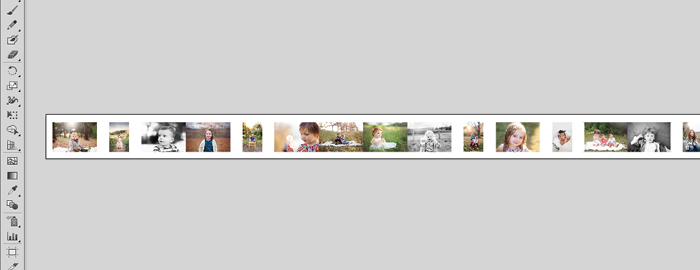
{Here is a snippet of my finished child portfolio}
Start with the two or three images which fully embody your work. These should be your opening images. Do the other images that follow live up to these? How many images your portfolio has is up to you. If you are just beginning in business I would aim for 10-20 amazing images per genre. This will be my 5th year in business and my child portfolio (which is my main focus) has just over 40 images. There is no magic number, but I follow one rule: every image in your portfolio should have a purpose; it should make your heart sing. If it doesn’t, it’s out.
And speaking of rules, I have a few more I follow when arranging my portfolio images… With a traditional portfolio, each image is going to click (scroll, fade, etc.) into the next, so you need to be careful about what images you are putting next to one another. Visually speaking, these are the guidelines I use when arranging my images:
1) Colors and tones in images next to one another should be similar, but not exact
2) Black and white images should be positioned away from one another (if this is a large focus for you, they will of course need to be shown closer together)
3) Often some of your best images will come from the same session. That’s OK! Just leave plenty of breathing room between these in your portfolio, especially if it is the same model
4) Images with models positioned in the same way (ie: child on the right hand-side of the frame, looking off to the left) should be positioned away from one another
It takes me about 30-60 minutes, per genre, to arrange my images in the best order. But it is worth it! I feel that my current portfolio shows off not only my best work, but gives potential clients a glimpse on what they can expect if they book me. I hope with a little organization you will be able to accomplish the same!